


HubSpot Service Hub starts cheap ($7 per seat on Starter), but its AI agent and knowledge base start on Professional: $90 per seat billed yearly, plus a required $1,500 onboarding fee. The Customer Agent then costs $0.50 per resolved conversation once the included credits run out.
For AI chat, a team inbox and a CRM at one team price from $19 a month, try CRMsoftware.pro. For a full help desk at scale, Zendesk. For cheap ticketing with AI included, Freshdesk. For the lowest seat price, Zoho Desk. For an email-first team, Help Scout.
For an AI-first help desk, Intercom (Fin). For shared email, Front. For AI without a per-resolution fee, LiveAgent. For Gmail teams, Hiver. For Shopify, Gorgias. For enterprise, Salesforce Service Cloud.
Updated November 7, 2026. We checked every price again and added LiveAgent and Gorgias as full reviews. New sections: a cost-per-AI-resolution table for 12 tools, a "who competes with Service Hub" table, and how to keep HubSpot CRM while replacing only the help desk or only the AI. Front's AI agent now starts at $0.39 per conversation, and Intercom (now Fin) belongs to Salesforce.
All prices come from each vendor's own pricing page, checked on November 7, 2026. They are list prices in US dollars, billed yearly unless we say otherwise, before tax. CRMsoftware.pro is our own product, so we list its limits too. We give no scores: each tool gets its real price, its pros and cons, and who it suits.
What HubSpot Service Hub costs in November 2026
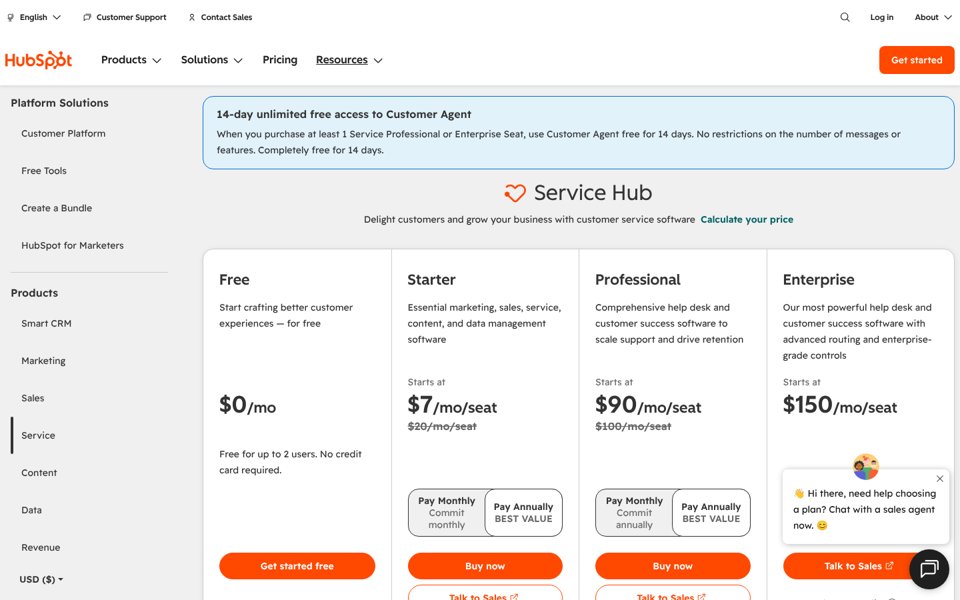
Service Hub is HubSpot's customer service product: ticketing, live chat, a help desk workspace, a knowledge base and the Customer Agent, all on the HubSpot CRM. Paid plans are priced per seat. The plans on November 7, 2026:
| Plan | Billed yearly | Billed monthly | What you get | What is missing |
|---|---|---|---|---|
| Free | $0, up to 2 users | Free service tools, live chat with HubSpot branding | No AI agent, no knowledge base | |
| Starter | $7 per seat (new customers; $20 list) | $10 per seat (new customers; $20 list) | Ticketing, live chat without branding, calling, Agent Builder, 500 HubSpot Credits a month | No Customer Agent, no knowledge base, no help desk workspace |
| Professional | $90 per seat | $100 per seat, on a yearly commitment | Customer Agent, help desk workspace, knowledge base, customer portal, surveys, 3,000 credits a month | Skill-based routing, conditional SLAs; $1,500 onboarding fee |
| Enterprise | $150 per seat, through sales | Conditional SLAs, skill-based routing, capacity limits, journey analytics, sandbox, 5,000 credits a month | $3,500 onboarding fee | |
The onboarding fees are one-time and required, according to HubSpot's pricing page. The Starter discount is for new customers only, so plan for the $20 list price at renewal.
HubSpot's legal catalog also describes a separate "flexible seats-and-credits" program, priced in euros and run as a limited release. It is not on the public US pricing page. If a rep offers it, compare the seat price and the credit allowance line by line.
What the Customer Agent costs
The Customer Agent is HubSpot's AI agent for chat, email, forms and calls. It is only on Professional and Enterprise. Since April 14, 2026, HubSpot bills it per resolved conversation: 50 HubSpot Credits per resolution in text channels. Voice, still in beta, uses 50 credits per minute.
Extra credits cost $0.010 each, pay-as-you-go, or $10 per pack of 1,000. So a resolution costs $0.50 once the included credits are used. The 3,000 credits in Professional cover up to 60 resolutions a month, fewer if other features use credits too. Credits reset monthly and do not roll over.
One rule to know: when the included credits run out, credit-based features pause until the reset date, unless you have bought extra credits. New Professional or Enterprise buyers get 14 days of unlimited Customer Agent use for free.
Why teams look for a HubSpot Service Hub alternative
- The AI agent starts at Professional. Starter has ticketing and chat but no Customer Agent and no knowledge base. To turn the AI on you pay $90 per seat plus $1,500 for onboarding.
- Seats add up fast. Five agents on Professional cost $450 a month billed yearly, or $500 paying monthly, before credits.
- Onboarding is mandatory. $1,500 on Professional and $3,500 on Enterprise, paid once, on top of the seats.
- Credits run out. 3,000 credits are 60 resolved conversations. If the AI resolves 200 conversations a month, you buy 7,000 more credits, or the agent pauses.
- The Starter price is a new-customer discount. HubSpot shows $7 and $10 against a $20 list price.
- You may not need the whole platform. If your sales team does not live in HubSpot, a standalone help desk is often cheaper and simpler.
Replace the help desk, the AI agent, or both?
"Leaving Service Hub" can mean three different projects. Decide which one is yours before you compare tools. HubSpot's App Marketplace lists help desk apps for Zendesk, Front, Freshdesk (HubSpot's own Data Sync app) and Help Scout, plus the Fin AI Agent (checked November 7, 2026).
| Your problem | What to change | Options |
|---|---|---|
| Sales and marketing love HubSpot, but Service seats are too expensive | Keep HubSpot CRM, change the help desk | Zendesk, Freshdesk, Help Scout (HubSpot integration on Plus), Front; CRMsoftware.pro syncs with HubSpot on Scale |
| You like the HubSpot help desk, but want a different AI agent | Keep Service Hub, change the AI | Fin runs on HubSpot for $0.99 per outcome, $49 monthly minimum with 50 outcomes, no seat fees. Note that HubSpot's own agent is cheaper per resolution ($0.50) |
| You want one cheaper tool for chat, AI, inbox and contacts | Replace both | The 11 tools below |
Who competes with HubSpot Service Hub, by category
Service Hub sits between help desks and CRMs, so its competitors depend on what you use it for. Tools in bold are reviewed in this guide.
| Category | Main competitors | Pick this group if |
|---|---|---|
| Full help desk suites | Zendesk, Freshdesk, Zoho Desk, LiveAgent, Kustomer | You need tickets, SLAs, routing and reports for many agents |
| CRM platforms with a service product | Salesforce Service Cloud, Zoho Desk with Zoho CRM | You want service and sales data on one record, like HubSpot |
| Email-first shared inboxes | Help Scout, Front, Hiver, Missive | Most of your support arrives by email |
| AI-first and chat-first tools | Intercom (Fin), CRMsoftware.pro, HelpCrunch, Crisp | Most of your support happens in chat and you want AI to answer first |
| Ecommerce help desks | Gorgias, Gladly | You sell on Shopify and handle orders and returns |
| Open source | Chatwoot | You want to host it yourself |
One change for 2026: Salesforce completed its purchase of Fin, formerly Intercom, on September 10, 2026. So two of HubSpot's biggest service competitors now have the same parent company.
HubSpot Service Hub alternatives at a glance
| Tool | Best for | Entry price (checked Nov 7, 2026) | How AI is billed | Free plan |
|---|---|---|---|---|
| HubSpot Service Hub (for reference) | Support on the HubSpot CRM | $7 per seat/mo (no AI agent); $90 with it | $0.50 per resolution after included credits | Yes, 2 users |
| CRMsoftware.pro | AI chat + inbox + CRM, users included | $19/mo for up to 8 users | AI messages included (1,000 a month on Launch) | Yes, 3 users, 100 AI messages |
| Zendesk | Full help desk at scale | $19 per agent/mo email only; $55 with chat | 5–10 resolutions per agent included, then $1.50–$2.00 | No, 14-day trial |
| Freshdesk | Cheap ticketing with AI included | $19 per agent/mo | First 500 sessions included, then $49 per 100 | No, 14-day trial |
| Zoho Desk | Lowest seat price | $7 per user/mo (Express, up to 5 users) | AI Agents from Express; generative AI with your own key | Yes, 3 users |
| Help Scout | Email-first support | $25 per user/mo | $0.75 per resolution | Yes, 5 users, 100 contacts a month |
| Intercom (Fin) | AI-first help desk | $19 per seat/mo for new customers ($29 list) | $0.99 per Fin outcome | No, 14-day trial |
| Front | Teamwork on shared email | $25 per seat/mo, up to 10 seats | Autopilot from $0.39 per conversation | No, 14-day trial |
| LiveAgent | AI with no per-resolution fee | $15 per agent/mo ($11 offer until Nov 22) | You pay your AI provider, about 2–4¢ a chat | No, 30-day trial |
| Hiver | Support inside Gmail | $25 per user/mo (Hiver Omni) | AI Agents on every plan; no usage price shown | No, 7-day trial |
| Gorgias | Shopify stores | $10/mo for 50 tickets (monthly) | $0.90 per AI interaction billed yearly ($1.50 past the plan's pack) | No, free trial |
| Salesforce Service Cloud | Enterprise CRM help desk | $25 per user/mo (Starter Suite); $195 for Core | Agentforce on Flex Credits | No |
What an AI resolution costs on each tool
In 2026 the AI agent is often the biggest line on the bill after seats. Vendors count it in different units, so "per resolution" and "per session" are not the same thing. A session or conversation is billed even when the AI fails and a person takes over.
| Tool | Billing unit | Price (Nov 7, 2026) | Included |
|---|---|---|---|
| HubSpot Customer Agent | Resolved conversation (50 credits) | $0.50 | 60 a month on Professional, 100 on Enterprise; not on Starter |
| Help Scout Envoy | Resolution | $0.75 | Free for the first 3 months |
| Gorgias AI Agent | Automated interaction (also counts as a ticket) | $0.90 billed yearly, $1.00 monthly | 30–530 a month by plan, then $1.50 each |
| Intercom Fin | Outcome, at most one per conversation | $0.99 | None |
| Fin on HubSpot or another help desk | Outcome | $0.99 | $49 monthly minimum with 50 outcomes |
| Zendesk AI agents | Automated resolution | $1.50 committed, $2.00 pay-as-you-go | 5 per agent a month (10 on Suite Professional) |
| Freshdesk Freddy AI Agent | Session, resolved or not | $0.49 ($49 per 100) | First 500 sessions |
| Front Autopilot | Conversation | From $0.39, through sales | None |
| LiveAgent | Your AI provider's usage | About 2–4¢ a chat (LiveAgent's estimate), no LiveAgent fee | AI agents on every plan |
| Zoho Desk | Not shown (generative AI is BYOK) | Not listed on the pricing page | AI Agents from Express |
| CRMsoftware.pro | AI message (one AI reply) | No per-resolution fee | 100 to 10,000 messages a month by plan |
| Hiver | Not shown | Not listed on the pricing page | AI Agents on every plan |
HubSpot's own agent is one of the cheapest per resolution. What makes Service Hub expensive is the $90 seat you need before you can turn it on. Ask every vendor what counts as a billable unit and whether you can cap monthly AI spend.
What 5 agents really pay
A typical Service Hub team: 5 agents and about 1,000 conversations a month. The AI agent takes 300 of them and fully resolves 200; the team answers the rest. Billed yearly, list prices, before tax.
| Tool and plan | How the bill adds up | Monthly total |
|---|---|---|
| HubSpot Starter | 5 × $7 = $35; no AI agent and no knowledge base, so the team answers all 1,000 conversations | $35 (no AI agent) |
| CRMsoftware.pro Growth | $49 flat for 20 users and 3,000 AI messages, enough for 300 AI conversations at about 3 messages each, plus the team inbox | $49 |
| Zoho Desk Standard | 5 × $14 = $70; AI Agents included, generative AI runs on your own AI key, billed by your provider | $70 + AI use |
| Hiver Growth | 5 × $25 = $125; AI Agents listed on every plan, no usage price on the pricing page | $125 |
| LiveAgent Team | 5 × $29 = $145 + 300 AI chats × 2–4¢ at your AI provider = $6–$12 ($110 for seats at the offer price until Nov 22) | about $151–$157 |
| Freshdesk Growth | 5 × $19 = $95; once the first 500 included sessions are used, 300 sessions × $0.49 = $147 | $95, then $242 |
| Front Starter | 5 × $25 = $125 + Autopilot from $0.39 × 300 conversations = $117; Starter covers one channel type | from $242 |
| Help Scout Standard | 5 × $25 = $125 + 200 resolutions × $0.75 = $150 (free for the first 3 months) | $275 |
| Intercom Essential | 5 × $19 = $95 + 200 outcomes × $0.99 = $198 | $293 |
| Gorgias Pro + AI Agent | $300 for 2,000 tickets + $171 for 190 AI interactions + 10 more at $1.50 = $15; billed per ticket, not per agent | about $486 |
| HubSpot Professional | 5 × $90 = $450 + 200 resolutions × 50 credits = 10,000 credits, minus 3,000 included = 7,000 × $0.01 = $70 | $520 + $1,500 once |
| Zendesk Suite Team | 5 × $55 = $275 + 175 resolutions beyond the 25 included × $1.50–$2.00 = $262.50–$350 | $537.50–$625 |
| HubSpot Enterprise | 5 × $150 = $750 + 5,000 credits beyond the 5,000 included × $0.01 = $50 | $800 + $3,500 once |
How we got these numbers: vendor list prices from November 7, 2026. Intercom uses the $19 new-customer price; at the $29 list price the total is $343. Spread over the first year, HubSpot's onboarding fee adds $125 a month to Professional, so year one costs about $645 a month.
LiveAgent's AI cost is its own estimate of what a typical chat costs at your AI provider. Salesforce is left out: a 5-agent team would be on Core at $195 per user ($975 a month) or a sales-led contract, which is not comparable. Your volumes will differ: try our cost per ticket calculator or chatbot ROI calculator.
CRMsoftware.pro includes users and AI messages in one flat price, with AI chat, a team inbox and a CRM pipeline, and no onboarding fee. Start free with 3 users, no card needed, or see pricing.
The 11 best HubSpot Service Hub alternatives
1. CRMsoftware.pro: best for AI chat plus a CRM at one team price
CRMsoftware.pro is our product, so judge this section with that in mind. Like HubSpot, it puts support and the CRM in one place. But the AI agent is in every plan, including the free one, and the price covers the team instead of each seat.
The agent answers on your website chat, WhatsApp, Telegram, Instagram, Messenger and Slack, and hands over to a person. Conversations turn into contacts and deals in the built-in pipeline. There is no setup fee.
- Price (Nov 7, 2026): Free for 3 users and 100 AI messages a month. Launch $19/mo billed yearly ($24 monthly) for 8 users and 1,000 AI messages. Growth $49 ($59) for 20 users and 3,000 AI messages. Scale $99 ($119) for 50 users and 10,000 AI messages.
- Pros: flat price for the whole team; AI messages included on every plan; replies in 95+ languages; CRM pipeline, bookings, quotes and AI voice built in; HubSpot and Salesforce sync on Scale.
- Cons: no classic ticketing with SLAs and no email channel listed on the plans; human handover starts on Launch and the team inbox with saved replies on Growth; far fewer integrations than HubSpot.
- Best for: small sales and support teams that want AI chat, an inbox and a CRM in one bill.
2. Zendesk: best full help desk at scale
Zendesk is the classic help desk Service Hub competes with: tickets, messaging, phone, a help center and AI agents in one suite. It has a HubSpot app, so your sales team can stay in HubSpot. Zendesk now also sells Forethought AI agents, which work on other help desks too.
- Price (Nov 7, 2026): Support Team $19 per agent a month billed yearly, email and ticketing only. Suite Team $55 adds messaging, live chat, telephony, a knowledge base and AI agents. Suite Professional $115 adds skills-based routing. AI agents include 5 resolutions per agent a month (10 on Professional), then $1.50 committed or $2.00 pay-as-you-go.
- Pros: scales to large teams; email-only plan at $19; no onboarding fee; a huge app marketplace.
- Cons: chat starts at $55 per agent; AI resolutions cost three to four times HubSpot's $0.50; Copilot is another $50 per agent.
- Note: Zendesk is moving accounts to "resolution tiers" with a dollar allowance ($2 per agent a month on Suite Team, $5 on Professional). Ask sales which model your contract uses.
- Best for: growing support teams that want a dedicated help desk. See our Zendesk vs Freshdesk comparison and Zendesk alternatives.
3. Freshdesk: best cheap ticketing with AI included
Freshdesk is a full ticketing help desk with a customer portal, a knowledge base and the Freddy AI Agent. Its entry plan includes the knowledge base and AI sessions that HubSpot keeps for Professional. HubSpot's own Data Sync app connects the two.
- Price (Nov 7, 2026): Growth $19 per agent a month billed yearly ($23 monthly), Pro $55 ($66), Enterprise $89 ($107). Every plan includes the first 500 AI Agent sessions; more cost $49 per 100. Copilot is $29 per agent on Pro and Enterprise. For chat and social channels, Freshdesk Omni is $29, $79 and $119.
- Pros: knowledge base and AI on the first paid plan; low seat price; no onboarding fee.
- Cons: AI is billed per session, so chats the AI does not solve still count; live chat needs Freshdesk Omni; no free plan.
- Best for: teams that want proper ticketing at a fraction of HubSpot Professional. More in our Freshdesk alternatives guide.
4. Zoho Desk: best lowest seat price
Zoho Desk is a ticketing help desk with the lowest seat prices in this list and a free plan. It follows the same suite idea as HubSpot if you also use Zoho CRM.
- Price (Nov 7, 2026): free for 3 users with email ticketing. Express $7 per user a month billed yearly ($9 monthly), up to 5 users. Standard $14 ($20), Professional $23 ($35), Enterprise $40 ($50). Express includes AI Agents and generative AI with your own AI key (BYOK); Zia AI starts on Professional.
- Pros: very low seat prices; free plan for 3 users; knowledge base from Standard; deep Zoho CRM integration.
- Cons: website live chat (Zoho SalesIQ) is listed only on Enterprise; generative AI cost depends on your provider; the interface takes time to learn.
- Best for: budget-conscious teams and Zoho users.
5. Help Scout: best for email-first support
Help Scout is a simple help desk with a shared inbox, live chat, a knowledge base (Docs) and an AI agent billed only when it resolves a conversation. It covers the core of Service Hub Professional for a small team, with no onboarding fee.
- Price (Nov 7, 2026): free for 5 users, 1 inbox and 100 contacts a month. Standard $25 per user a month billed yearly ($30 monthly), up to 25 users. Plus $45 ($54), up to 50 users. Pro $75 ($90), minimum 10 users. The Envoy AI add-on is $0.75 per resolution, free for 3 months.
- Pros: live chat, SMS, WhatsApp, Instagram and Messenger from Standard; clean inbox; HubSpot integration on Plus.
- Cons: no sales CRM; per-user pricing; round-robin routing and advanced SLAs start on Plus.
- Best for: email-first support teams under 25 people. More in our Help Scout alternatives guide.
6. Intercom (Fin): best AI-first help desk
Intercom is the chat-first help desk built around Fin, one of the most advanced AI agents. The company renamed itself Fin in 2026, and Salesforce completed its purchase on September 10, 2026. The helpdesk is still sold as Intercom.
- Price (Nov 7, 2026): Essential $19 per seat a month billed yearly for new customers ($29 list), Advanced $85, Expert $132. Fin costs $0.99 per outcome on every plan, charged at most once per conversation. Copilot is $29 per agent. 14-day trial with no card.
- Pros: strong AI agent from the first plan; good messenger and in-app tools; Fin also runs on HubSpot if you keep it.
- Cons: $0.99 per outcome is about twice HubSpot's $0.50; seats plus outcomes add up; no free plan; new owner.
- Best for: chat-first teams that want AI to resolve a large share of conversations. See Intercom vs Zendesk and Intercom alternatives.
7. Front: best for teamwork on shared email
Front looks like email but works like a help desk: shared inboxes, assignments, comments on conversations and rules. It suits teams where support, account managers and operations answer customers together.
- Price (Nov 7, 2026): Starter $25 per seat a month billed yearly, up to 10 seats and one channel type. Professional $65, up to 50 seats, omnichannel. Enterprise $105 with Copilot, QA and CSAT included. Autopilot now starts at $0.39 per conversation, through sales. Copilot is $20 per seat below Enterprise.
- Pros: strong collaboration; a HubSpot app; 14-day trial with no card.
- Cons: Starter covers one channel type only; WhatsApp is a paid add-on from Professional (Meta fees plus 20%); no free plan.
- Best for: teams that collaborate on customer email all day. More in our Front alternatives guide.
8. LiveAgent: best AI with no per-resolution fee
LiveAgent is a help desk with email, live chat, a knowledge base and a call center from the Team plan. Its AI works differently: you connect your own provider (OpenAI, Anthropic, Google Gemini or FlowHunt), and LiveAgent adds no AI fee on top.
- Price (Nov 7, 2026): Starter $15 per agent a month billed yearly ($19 monthly), up to 5 agents. Team $29 ($35), up to 15 agents. Business $49 ($59). Until November 22, 2026 an offer price applies: $11, $22 and $38 billed yearly, kept while you stay on the plan. LiveAgent estimates a typical AI chat at 2–4¢ at your provider.
- Pros: AI cost is close to raw provider cost; call center included from Team; 30-day trial with no card.
- Cons: you manage an AI provider account; Starter has no social channels, calls or reports; no free plan.
- Best for: cost-conscious teams that want email, chat, phone and AI in one help desk.
9. Hiver: best for support inside Gmail
Hiver began as a help desk inside Gmail and now also sells Hiver Omni, a standalone omnichannel platform. If your team works in Google Workspace, there is little new to learn.
- Price (Nov 7, 2026, Hiver Omni): Growth $25 per user a month billed yearly ($35 monthly), up to 10 users, with AI Agents, Copilot, shared inbox, email and live chat. Pro $55 ($65) adds a customer portal, SLAs, CSAT, API access and CRM integrations. Elite $85 ($95) adds AI QA, skill-based routing, SSO and HIPAA.
- Pros: AI agents on the first plan; works where Gmail users already are; free data migration.
- Cons: CRM integrations and SLAs start at $55; the pricing page does not show what AI agent usage costs; 7-day trial only.
- Best for: Google Workspace teams.
10. Gorgias: best for Shopify stores
Gorgias is a help desk built for ecommerce. It shows order data next to each ticket and charges by ticket volume, never per agent. If your Service Hub tickets are mostly "where is my order", it is the closer fit.
- Price (Nov 7, 2026): Starter $10 a month for 50 tickets, monthly billing only. Basic $50 billed yearly ($60 monthly) for 300 tickets, Pro $300 ($360) for 2,000, Advanced $750 ($900) for 5,000. AI Agent packs include 30 to 530 interactions a month by plan, at $0.90 each billed yearly ($1.00 monthly), then $1.50 each. Each one also counts as a ticket.
- Pros: no per-agent fees; the AI Agent can take actions such as cancelling an order or applying a discount (from Basic).
- Cons: not a fit outside ecommerce; busy months raise the bill; AI interactions count twice, as AI and as tickets.
- Best for: Shopify brands with order, shipping and return questions.
11. Salesforce Service Cloud: best enterprise CRM-based help desk
Salesforce is the other big CRM with a service product. It makes sense when you need what HubSpot Enterprise offers and more: complex case management, contact center features and deep customization. Salesforce now also owns Fin.
- Price (Nov 7, 2026): Starter Suite $25 per user a month (sales, service and marketing basics, billed monthly or yearly). Pro Suite $100, billed yearly with a contract. Service Cloud editions, billed yearly: Core $195 per user, Advanced $395 and Max $550. Agentforce runs on Flex Credits: 500,000 per org included on Core, 1 million on Advanced.
- Pros: the most configurable platform; contact center and field service add-ons; a huge partner network.
- Cons: service editions cost far more than HubSpot Professional; needs an admin or partner to set up.
- Best for: large companies already on Salesforce.
Also considered
Kustomer and Gladly (customer-centric help desks for large consumer brands), HelpCrunch (chat, email and help center for small teams) and Chatwoot (open source; free cloud plan for 2 agents). If you are leaving the whole HubSpot platform, not just Service Hub, read our HubSpot alternatives guide.
Free HubSpot Service Hub alternatives
| Tool | What the free plan includes (Nov 7, 2026) | Main catch |
|---|---|---|
| HubSpot Free | Up to 2 users, free service tools, live chat | HubSpot branding; no AI agent |
| CRMsoftware.pro | 3 users, 100 AI messages and 3 AI voice minutes a month, 1 bot, 1 website, 1 pipeline | Messaging channels and human handover start on Launch ($19) |
| Help Scout | 5 users, 1 inbox, 1 Docs site, 100 contacts a month | Low contact limit |
| Zoho Desk | 3 users, email ticketing | No chat channels |
| Chatwoot | 2 agents, 500 conversations a month (cloud), or self-host | 30-day data retention on the free cloud plan |
When to stay on HubSpot Service Hub
Stay if your marketing and sales teams already work in HubSpot and you need tickets, deals and marketing emails on the same contact record. That shared view is hard to rebuild with separate tools. HubSpot's Customer Agent is also cheap per resolution at $0.50.
Starter at $7 per seat is a fair price if you only need ticketing and chat without AI. Moving makes sense when Professional seats and onboarding cost more than the shared CRM is worth to you, or when only your support team uses HubSpot.
How to choose
| If you… | Choose |
|---|---|
| want AI chat, an inbox and a CRM at one team price | CRMsoftware.pro |
| need a full help desk for a growing team | Zendesk |
| want proper ticketing and AI at a low seat price | Freshdesk |
| want the lowest seat price or already use Zoho | Zoho Desk |
| mostly answer email in a small team | Help Scout |
| want the AI to resolve as many chats as possible | Intercom (Fin) |
| work together on shared email all day | Front |
| want AI without a per-resolution fee, plus phone | LiveAgent |
| live in Gmail and Google Workspace | Hiver |
| run a Shopify store | Gorgias |
| are an enterprise on Salesforce | Salesforce Service Cloud |
| like the HubSpot help desk but want a different AI | Fin on HubSpot |
Before you sign, ask each vendor three questions: what counts as a billable AI resolution or session, what the price is at renewal, and whether you can set a monthly cap on AI spend.
How to switch from HubSpot Service Hub
- Check your renewal date. Yearly HubSpot plans run to the end of the term, so plan the move for your renewal and lower your Service seats then.
- Export tickets and contacts. You can export them to CSV or Excel from the ticket and contact list views. Pull conversation history through the API or a migration service.
- Move the knowledge base. Your articles train the new AI agent, so import them first and test 20 real customer questions. Our FAQ knowledge base starter helps if you need to rebuild.
- Keep HubSpot CRM if sales uses it. Connect the new help desk through the HubSpot App Marketplace so agents still see contact and deal data.
- Rebuild routing and the handover rule. Decide when the AI passes a chat to a person. The human handover playbook covers the common cases.
- Recreate saved replies. Our live chat canned responses save time.
- Reconnect channels. Forward your support email, replace the HubSpot chat widget, and reconnect WhatsApp, Messenger and phone.
- Run both for a week, then remove the HubSpot chat code from every page and your tag manager.
- First response time calculator · Free calculator
- Live chat staffing calculator · Free calculator
- CSAT score calculator · Free calculator
- Live chat script templates by chat type and industry · Template
- Support reply templates that put the answer first · Template
FAQ
What is the best HubSpot Service Hub alternative?
For small teams that want AI chat, an inbox and a CRM with users and AI messages included, CRMsoftware.pro from $19 a month. For a full help desk, Zendesk. For cheap ticketing with AI, Freshdesk. For the lowest seat price, Zoho Desk. For an email-first team, Help Scout. For an AI-first help desk, Intercom (Fin).
Who are HubSpot Service Hub's main competitors?
Zendesk, Freshdesk, Zoho Desk and LiveAgent among help desks; Salesforce Service Cloud among CRM platforms; Help Scout, Front and Hiver for email-first teams; Intercom (Fin) and CRMsoftware.pro for AI-first chat; and Gorgias in ecommerce.
How much does HubSpot Service Hub cost in 2026?
On November 7, 2026: Free for up to 2 users; Starter $7 per seat a month billed yearly ($10 monthly) for new customers, $20 list; Professional $90 per seat billed yearly ($100 monthly) plus a $1,500 onboarding fee; Enterprise $150 per seat plus $3,500 onboarding.
How much does the HubSpot Customer Agent cost?
It uses 50 HubSpot Credits per resolved conversation in text channels, which is $0.50 at $0.010 per extra credit. Professional includes 3,000 credits a month (60 resolutions) and Enterprise 5,000. It is not available on Starter.
What happens when HubSpot Credits run out?
According to HubSpot's product catalog, features that use credits pause until your monthly reset date, unless you have bought extra credits. You can buy them pay-as-you-go at $0.010 each or in packs of 1,000 for $10.
Does HubSpot Service Hub Starter include AI?
Starter includes 500 HubSpot Credits and Agent Builder, but not the Customer Agent that answers customers, and no knowledge base. Both start on Professional.
Is the HubSpot onboarding fee required?
Yes, according to HubSpot's pricing page: a one-time $1,500 Professional Onboarding and $3,500 Enterprise Onboarding are required and not included in the seat price.
Is Zendesk cheaper than HubSpot Service Hub?
Per seat, yes: Zendesk Suite Team is $55 per agent against $90 for Service Hub Professional, with no onboarding fee. AI resolutions are cheaper on HubSpot ($0.50 against $1.50–$2.00), so a busy AI agent narrows the gap. In our 5-agent example the monthly totals are close: $520 against $537.50.
Can I keep HubSpot CRM and use another help desk?
Yes. HubSpot's App Marketplace lists help desk apps for Zendesk, Front, Freshdesk (HubSpot's own Data Sync app) and Help Scout (HubSpot integration on its Plus plan). CRMsoftware.pro syncs with HubSpot on Scale. You can keep sales and marketing in HubSpot and move only support.
Can I use Fin with HubSpot?
Yes. Fin works with existing help desks, including HubSpot, for $0.99 per outcome with a $49 monthly minimum that includes 50 outcomes and no seat fees. HubSpot's own Customer Agent costs less per resolution ($0.50) but needs Professional seats.
Which HubSpot Service Hub alternative has a free plan?
Zoho Desk (3 users), Help Scout (5 users, 100 contacts a month), CRMsoftware.pro (3 users with 100 AI messages) and Chatwoot (2 agents). HubSpot's own free tools cover 2 users.
How long does it take to switch from HubSpot Service Hub?
A small team can usually move in one to two weeks: export tickets and contacts, load the knowledge base, rebuild routing and saved replies, then run both tools side by side for a few days. Time it for your HubSpot renewal.
Sources
- HubSpot Service Hub pricing, checked Nov 7, 2026 (USD), monthly and yearly options, plan features and onboarding fees.
- HubSpot Product and Services Catalog: credit price, capacity packs, HubSpot Credits Rate Sheet and the credit-pause rule, checked Nov 7, 2026.
- HubSpot: Customer Agent and Prospecting Agent, now you pay when the task is complete, updated April 13, 2026.
- HubSpot App Marketplace: help desk apps, checked Nov 7, 2026.
- Salesforce: Salesforce Completes Acquisition of Fin, September 10, 2026.
- Pricing pages checked Nov 7, 2026: Zendesk, Freshdesk, Freshdesk Omni, Zoho Desk, Zoho Desk Express, Help Scout, Intercom, Fin, Front, LiveAgent, Hiver, Gorgias, Salesforce Service Cloud, Chatwoot, CRMsoftware.pro.
AI support and a CRM without per-seat pricing
AI chat, a team inbox and a CRM pipeline with users and AI messages included, and no onboarding fee. Free for 3 users; Launch is $19/month billed yearly for 8 users and 1,000 AI messages, Growth $49 for 20 users and 3,000.
Start free See pricing


